
How to see graded card prices during a Whatnot show
GradeRoute is an extension for Google Chrome on a computer. When a graded slab comes up in a Whatnot show, it reads the barcode on the label and shows the median sold price for that card and grade beside the stream.
2 free Whatnot streams. Desktop Chrome. Sign in with Google. No payment card.
Try a free Whatnot stream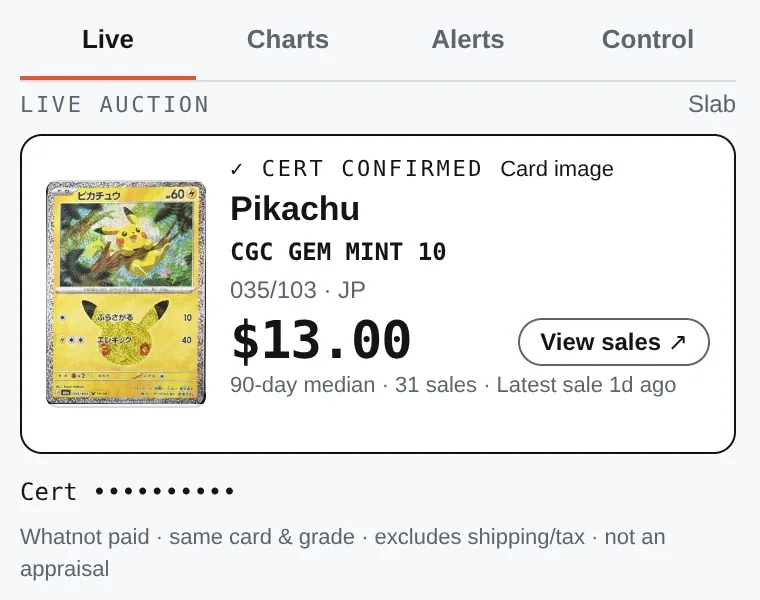
What you need
- A computer with Google Chrome. The extension does not work in the Whatnot phone app or in a phone browser.
- A Google account. It is the only sign-in.
- A Whatnot show that auctions graded PSA or CGC slabs, with auctions of about 10 seconds or longer.
On your phone right now? Whatnot prices need Chrome on a computer. Send yourself this page and open it there. Sign in with the same Google account on both.
This phone can scan a slab right now. 25 free scans. Scan my slab free
Set-up, step by step
Sign in to GradeRoute on your computer
Open graderoute.com in Chrome, choose "Try a free Whatnot stream" and sign in with Google.
Get the extension
After you sign in, choose "Get the extension" at the top of the page and download the file. GradeRoute is not in the Chrome Web Store yet, so you add it by hand. The next step shows how.
Add it to Chrome
Unzip the download. In Chrome's address bar type
chrome://extensionsand press Enter. Turn on "Developer mode" at the top right. Choose "Load unpacked" and pick the folder you unzipped. This is the normal way to add an extension that is not in the store. The install guide has more.Sign in inside the extension
Use the same Google account. The first time, the extension shows a notice. Read it and accept it to go on.
Open a Whatnot show
Open a show with graded slabs in the same Chrome window. When a slab comes up, the panel shows the card and the median.
What the first-run notice tells you
In short, it says: the prices are past sales and not an appraisal; they can be incomplete or wrong; GradeRoute is not affiliated with Whatnot; and what GradeRoute collects from the public stream you are watching. That is frames and card crops from the stream, the sale facts of each finished auction (card, grade, price, time) and the seller's store name. For a sold lot it also records the buyer's Whatnot username; that name is kept for a limited time and is only ever shown masked. It does not collect chat. It keeps your Google sign-in email. The auction evidence is kept without a time limit, is used to improve card recognition, including training GradeRoute's own models, and stays in place if you delete your account. The Privacy page has the full text.
What the extension does and does not do
It reads the public stream you are already watching. It never bids, buys or posts, and it does nothing on your Whatnot account.
Reading the panel
- "Cert confirmed" means the barcode on the label was read. The card and grade are the grader's own record for that certificate.
- Before the barcode reads, the panel may show a best guess from the picture. It is replaced when the barcode reads.
- The price is one median over the last 90 days of eBay sold and Whatnot paid sales for that card and grade. The number of sales is beside it.
- Check the card number and the full grade before you compare. The auction on screen can end above or below the median.
- The Charts tab shows each sale as a dot, with eBay and Whatnot shown apart.
When there is no price
- The barcode was not readable on camera. Slabs held at an angle or behind glare often do not read.
- The card was found, but it has fewer than 5 matching sales in the last 90 days. The panel shows how many there were.
- The lot is not a graded PSA or CGC slab.
When does a free stream count?
A stream is one Whatnot show. It counts when the first slab in that show gets a price. If no slab gets a price, nothing is used. Coming back to the same show on the same account does not use another one. The seller's next show is a new stream. You get 2 free streams per Google account. They do not refill.
If the panel says free streams are full
A limited number of free accounts can use the panel at the same time. If it says "Free streams are full right now. Try again in a few minutes.", wait a little and it will start. Nothing is used while you wait.
When your free streams are used
The panel tells you. Paid plans and stream packs are planned and not on sale yet, so the message gives our email, support@graderoute.com.