
How to scan a PSA or CGC slab and see its sold price
Use your phone's camera to read the barcode on a PSA or CGC label. GradeRoute finds the exact card and grade and shows the median of recent sales.
25 free scans. Sign in with Google. No payment card.
Scan my slab free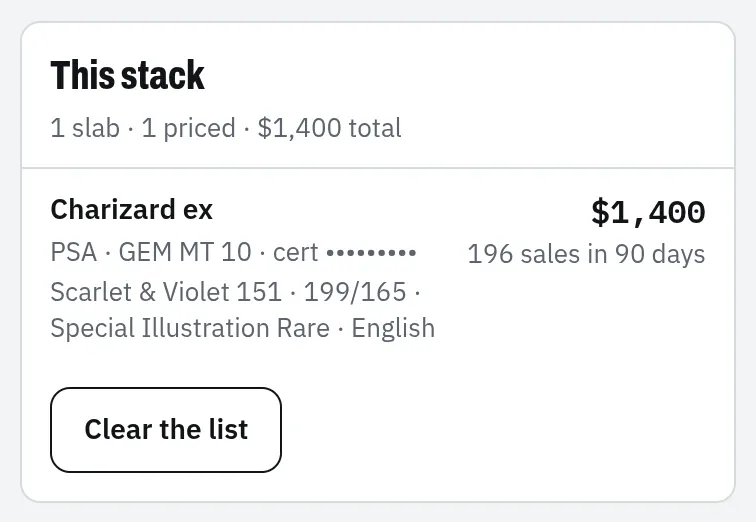
From barcode to price, step by step
Sign in and open the scan page
Tap "Scan my slab free" and sign in with Google. The scan page opens in your phone's browser. There is no app to install.
Let the page use the camera
Tap "Scan with the camera". Your phone asks if the page may use the camera. Say yes. The barcode is read on your phone. The picture is not sent anywhere. Only the certificate number is.
Read the barcode
Hold the barcode on the label inside the box on screen, close enough to fill it. If the barcode is on the back of the slab, flip it over.
Check the card against your label
The page shows the card name, the number, the language and the full grade. Compare them with the label in your hand. On a CGC slab read the whole grade: a Gem Mint 10 and a Pristine 10 are two different prices.
Read the price
You see one median for that card and grade and the number of sales behind it. More sales means a steadier number.
Scan the next slab
Each slab joins a list called "This stack". The page shows how many slabs you scanned, how many have a price, and the total. Tap "Clear the list" to start over. The list is also cleared when you close the page.
When the barcode will not read
- Glare: tilt the slab or move away from a bright light.
- Too far: move closer until the barcode fills the box.
- Camera will not start, or you said no to the camera: tap "Take a picture" and photograph the label instead.
- Still no luck, or an old label with no barcode: type the number printed on the label into "Cert number" and tap "Add".
- A handheld barcode scanner plugged into a computer works too. It types the number into the same box.
When there is no price
The page says it is looking the slab up. GradeRoute has not seen this certificate before, so it asks the grader once. This can take a minute. If the page says "Still looking", add the slab again a little later.
The card shows, but with no price. GradeRoute counted fewer than 5 matching sales in the last 90 days. The row shows how many there were and says "Too few for a price". GradeRoute does not guess, and it does not borrow a price from a nearby grade. A missing price does not mean the card is worth nothing.
The slab is autographed, altered or has an error label. Sales of these slabs are kept out of the medians, so GradeRoute has no fair price for them yet.
The page says "Lookup limit reached. Try again later." A slab GradeRoute has never seen is looked up at the grader, and at busy times those lookups are held back. Add the slab again later.
What counts as a scan
A scan counts only when a price shows. A slab with no price does not count. Scanning the same slab again is free. You get 25 free scans per Google account. They do not refill.
What the price tells you, and what it does not
The median is the middle price of recent sales of the same card and grade. It is not an appraisal and not an offer. It rests on 5 or more sales, and more sales make it steadier, so read the count beside it. It does not know about your one slab: the past sales of one slab are part of Research. The paid plans add Research and a price chart to each scan. They are planned and not on sale yet.