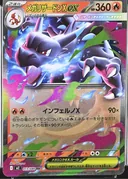
No. 1 on Whatnot this weekInferno X · Japanese
Holo
Mega Charizard X ex #013/080
CGC Pristine 10 median, 90 days to Nov 22, 2026
$30375 sales on eBay and Whatnot
Google sign-in does not work inside this app's browser. Open this page in your phone's own browser, then sign in.

Look up a PSA or CGC graded card on your phone, or price the slabs on screen during a Whatnot show. You get one number: the median of eBay sold and Whatnot paid sales for that exact card and grade over the last 90 days.
Free: 25 scans and 2 Whatnot streams. Sign in with Google. No payment card.
See plans and stream packsWorks with Pokémon and other cards in PSA and CGC slabs, in English, Japanese, Korean and Chinese. PSA sports cards can be scanned too.
375 sales on eBay and Whatnot
On your phone
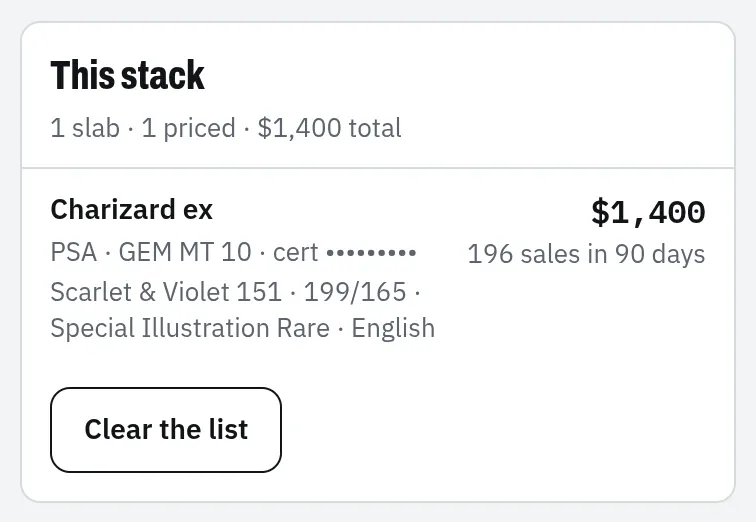
Scan a whole stack. Each slab is added to a list, and the page shows how many slabs you scanned, how many have a price, and the total. That helps at a card show or when you price a box of slabs.
The picture stays on your phone. Only the certificate number is sent. The list is cleared when you close the page.
What counts. A scan counts only when a price shows. Scanning the same slab again is free. You get 25 free scans per Google account. They do not refill each month.
Good to know. A slab GradeRoute has never seen is looked up once at the grader. That can take a minute. The page keeps checking for you.
25 free scans. Sign in with Google. No payment card.
Desktop Chrome
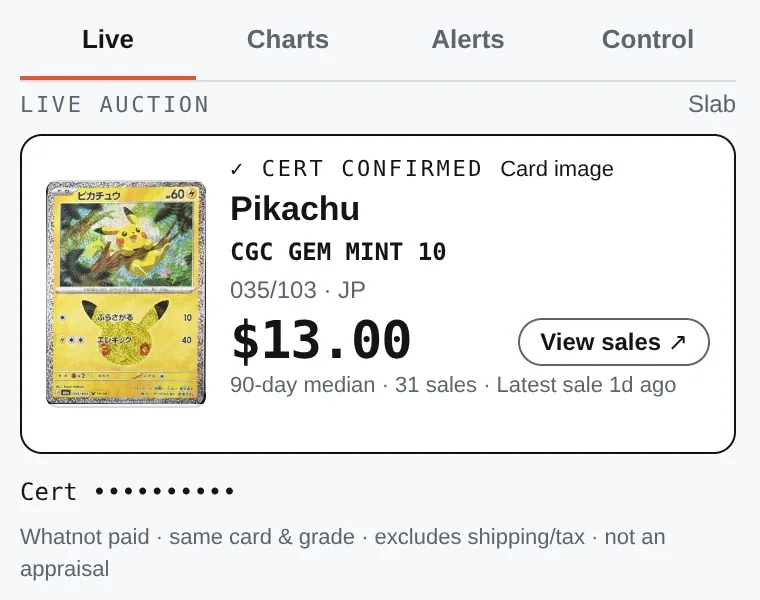
Add the GradeRoute extension to Chrome on a computer and sign in with the same Google account. Open a Whatnot show that auctions graded slabs. When a slab comes up, GradeRoute reads the barcode on the label, finds the card and grade, and shows the median for that card and grade in a panel beside the stream.
The extension reads the public stream you are watching. It never bids, buys or posts, and it does nothing on your Whatnot account. It works in Chrome on a computer. It does not work inside the Whatnot phone app.
A stream is one Whatnot show. It counts when the first slab in that show gets a price. If nothing gets a price, nothing is used. Coming back to the same show on the same account does not use another one. The seller's next show is a new stream.
A free stream shows the same panel as a paid one. At busy times the free streams can be full. The panel then says "Free streams are full right now. Try again in a few minutes."
2 free Whatnot streams. Desktop Chrome. Sign in with Google. No payment card.
GradeRoute is not in the Chrome Web Store yet. You load it by hand. The install guide shows each step.
On your phone right now? Whatnot prices need Chrome on a computer. Send yourself this page and open it there. Sign in with the same Google account on both.
This phone can scan a slab right now. 25 free scans. Scan my slab free
Scan the barcode on a PSA label to find the exact card and its PSA grade. PSA 10, PSA 9 and every other grade each have their own median. Pokémon, sports and other PSA cards can be scanned.
CGC prints a full label on each slab, and GradeRoute prices each label apart. CGC Gem Mint 10 and CGC Pristine 10 are two different prices.
A Japanese printing is priced apart from the English one, even when the art is the same. Japanese (JP), Korean (KR), Simplified Chinese (S-Chinese) and Traditional Chinese (T-Chinese) cards are labeled on every screen.
A card can be identified and still have no price. A price needs 5 or more matching sales in the last 90 days. With fewer, you see the card, the grade and how many sales there were. Help with a barcode that will not read or a missing price.
GradeRoute collects two kinds of sales: eBay listings that sold, and Whatnot lots that closed and were paid. It files each sale under the exact card, language, grader and grade. With 5 or more sales in the last 90 days it shows the median, the middle price when the sales are lined up from low to high, with the number of sales beside it. With fewer it shows the count and no price. A few very high or very low sales barely move a median, which is why it is the number shown.
The certificate number comes from the barcode. The grade comes from the grader's record for that certificate. A sale counts only when GradeRoute can read the certificate number and match it to the card and grade. Other sales may be missing.
A sale under $1.00 never counts. An eBay best offer counts only at the accepted price. A Whatnot lot with no bids, no payment or a failed payment never counts. Grades and graders are never blended: a PSA 10 is never used to price a CGC 10, and a 9 is never used to fill in for a 10.
A raw Near Mint price, where shown, is a separate TCGplayer line. It is never mixed into a graded median.
The median is a fact about past sales. It is not an appraisal and not an offer to buy or sell.
Read the full methodOne median for each grade, the number of sales behind it, and the dates the numbers cover.
Scan your own slab and see the card, the grade label and the median for it. Use the Whatnot panel on 2 shows.
One card, every grade, on a chart. The eBay median and the Whatnot median side by side. Every counted sale, and the earlier sales of one slab when the same certificate sold before. Included in the Scan, Starter and Pro plans. Planned. Not on sale yet.
Sales of other copies show how a grade has traded. They do not tell you what your own slab sold for before. The past sales of one slab are part of Research.
Tilt the slab to lose the glare, or move it closer until the barcode fills the box. If the barcode is on the back, flip the slab. You can also take a picture, or type the certificate number printed on the label.
GradeRoute has not seen this certificate before. It asks the grader once. That can take a minute. If the page says "Still looking", add the slab again a little later. At busy times it may say "Lookup limit reached. Try again later."
GradeRoute counted fewer than 5 matching sales in the last 90 days. The page shows how many there were. A missing price does not mean the card is worth nothing. It means GradeRoute will not guess.
Check the number on the label against what you typed. If the scan read the right number and the card is still wrong, email support@graderoute.com with the grader and what the page showed. Do not send the certificate number in a public post.
A free scan prices the card and grade, not your one slab. The past sales of one slab are part of Research, which is planned and not on sale yet.
Sales of these slabs are kept out of the medians, so GradeRoute has no fair price for them yet.
The Free plan is open now to any Google account. The paid plans and stream packs below are planned. They are not on sale yet, and nothing is charged today. Prices are in US dollars.
| Plan | Price | Phone scans | Whatnot streams | Research | Status |
|---|---|---|---|---|---|
| Free | $0 | 25, once | 2, once | Not included | |
| Scan | $3.99 a month | Unlimited, with the price chart | Your free streams, plus any packs | Included | Planned. Not on sale yet. |
| Starter | $19 a month | Unlimited, with the price chart | 10 streams | Included | Planned. Not on sale yet. |
| Pro | $49 a month | Unlimited, with the price chart | 50 streams | Included | Planned. Not on sale yet. |
A pack adds streams to any account, Free included. Pack streams never expire. Planned. Not on sale yet.
The scan page and the panel tell you when your free scans or free streams are used. Paid plans are not on sale yet, so the message gives our email, support@graderoute.com. Write to us if you want to keep going. Card guides and the weekly report stay free to read.
At a card show or at home, scan the barcode with your phone. Check the label, then read the median and the number of sales. Scan the next one and watch the stack total.
Open its card guide. It lists one median for each grade with the sale count and the dates. No sign-in.
Browse card price guidesUse Chrome on a computer and keep the median beside the stream. When the barcode reads, the card and grade come from the grader's record, usually a few seconds after the lot opens.
Find the card under Spotlight Sales. Each sale shows the grade, the price, the date and the median it is compared with.
Sales from our videosThe 10 cards at the top of the latest weekly Whatnot report. Each opens a free price guide.
 Mega Charizard X ex #013/080
 Pikachu #033/103
 Bulbasaur #064/063
 Mega Gengar ex #003/021
 Pikachu #038/103
 Gengar ex #076/103
 Pikachu #030/103
 Pikachu ex #047/103
 Pikachu #026/103
 Pikachu #019/103
All card price guidesThis week's Whatnot reportAll weekly Whatnot reportsHow the price is worked out
GradeRoute is an independent price tool for graded trading cards. It is not part of The Pokémon Company, Nintendo, PSA, CGC, eBay, Whatnot or TCGplayer, and none of them sponsor it. The numbers on this site are GradeRoute's own counts of sales it could match to a certificate.
Questions, a wrong card, a wrong grade or a wrong price: support@graderoute.com. Tell us the page and what looks wrong.
Yes, to start. Any Google account gets 25 phone scans and 2 Whatnot streams. There is no payment card to enter. Card guides and the weekly report are free to read with no account.
Today the app tells you they are used and gives our email. Paid plans are planned and not on sale yet. The planned prices are in the table above.
A scan is one slab that comes back with a price. A slab with no price does not count, and scanning the same slab again does not count. A stream is one Whatnot show. It counts when the first slab in that show gets a price. Leaving and coming back to the same show on the same account does not use another one.
From eBay listings that sold and from Whatnot lots that were paid. GradeRoute shows one median for each card and grade over the last 90 days, with the number of sales beside it.
One sale can be far too high or far too low. The median is the middle of all the sales, so one odd sale does not move it much. It is a fact about past sales. It is not an appraisal and not an offer to buy or sell.
PSA and CGC. Other graders are not covered today.
Yes. Each language is its own printing with its own price, and the language is shown beside the card. Most of the Whatnot sales GradeRoute has counted so far are Japanese cards in CGC slabs.
You can scan a PSA sports card to see the card and grade. A price shows when there are 5 or more matching sales in the last 90 days. There are no sports card guides yet.
GradeRoute counted fewer than 5 matching sales in the last 90 days, or it is an autographed, error-label or altered slab, or GradeRoute is still looking the certificate up. See Scan help.
No. It reads the public stream you are watching and shows prices. It never bids, buys or posts.
Your Google sign-in email, and which slabs and shows your account has used, so the free scans and streams can be counted. On the scan page, the picture stays on your phone and only the certificate number is sent. The Whatnot extension shows a notice the first time you use it that lists what it reads from the stream. The Privacy page has the details.
Email support@graderoute.com with the page address and what looks wrong.
Sign in to scan another slab or open the Whatnot extension setup.